Where you build the page
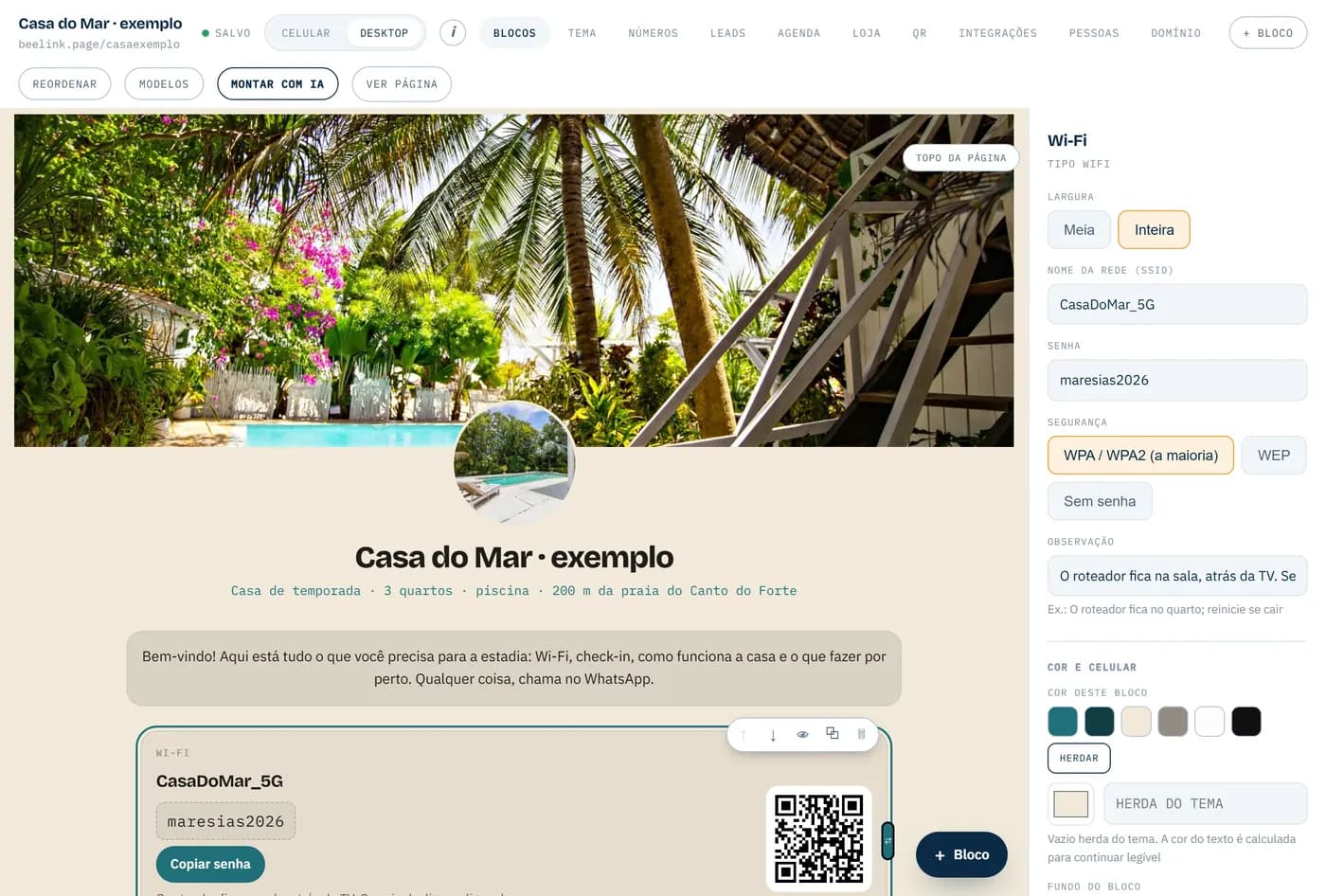
Every piece of the page is a block: a button, a photo, a price list, a video. You click the block and change it right beside it — and the page keeps changing in front of you, exactly as it will look.
For whoever got a link and was not sure
The link you were sent is the outside. Inside there is a panel that opens on your phone, with your email, and changes everything: photo, text, price, colour, the order of things. Any time, without asking anyone and without paying again.
It takes thirty seconds and asks for nothing at all.
The first version, yes — and on purpose. The AI reads your website or your Instagram and builds the page in twenty seconds, which saves a week of going back and forth. The difference starts after that.
Every change goes back to whoever made it. You ask, you wait, you hope, and often you pay again. The day you lose touch with them, you lose the page too.
You sign in with your email and change it. At eleven at night, from your phone, on a Sunday. The address is yours, the client list is yours, and the key stays with you even when we are not around.
One was made for you. The other is yours.
This example page is made up, but the way you change it is the same as in the panel. Write the name, change the colour, switch the pieces on and off.
your page, live
Type a name, change the colour, switch things on and off. The page changes right there.
Every word in that top row is a screen. Here is what is in each one, with nothing dressed up.
Every piece of the page is a block: a button, a photo, a price list, a video. You click the block and change it right beside it — and the page keeps changing in front of you, exactly as it will look.
Pick a colour and the whole page adjusts to it. If the colour you chose makes the text hard to read, the system corrects the shade of the type itself — nobody publishes a page that cannot be read.
Some people call this a CRM. In practice: whoever filled in the form or tapped to message you ends up on a list, with their name, their number, what they wanted and which button they came from. It also lands in your inbox, immediately.
You set the days and hours you work, and how long each service takes. The client only sees what is free and books it. The slot closes for everyone else at that instant, you get an email, and the appointment lands in your Google Calendar.
Products with options and stock, a basket, delivery or collection, and the order landing with you. Payment is settled on WhatsApp, where you already talk to them — Beelink takes nothing per sale.
How many people opened the page and which button they pressed. It is like knowing which shop window makes people stop on the pavement — except the number is on the screen.
Your page as a QR code, ready for the card, the sticker on the door, the menu or the van. Any phone camera opens it.
It starts at beelink.page/yourname. If you have (or want) yourbusiness.com, that becomes the address of the page, at no extra charge.
You sign in at beelink.page/painel with your email or your Google account. There is no password to forget: a link arrives in your inbox and that is it.
The trade loves an acronym. If these come up, this is what they mean.
It is not about how the page looks. It is about what happens the week after, when something in the business changes.
A finished page someone sends youYou ask whoever built it, and you wait.
Yours, on BeelinkYou sign in, type it and save. It is already live.
A finished page someone sends youLost somewhere in the messages.
Yours, on BeelinkOn a list, with the number and what they were after.
A finished page someone sends youBack and forth on WhatsApp until a slot turns up.
Yours, on BeelinkThe client picks a free slot and books it themselves.
A finished page someone sends youGuesswork.
Yours, on BeelinkThe number of people who came in, and of people who clicked.
A finished page someone sends youIt waits until someone has time.
Yours, on BeelinkYou upload it from your phone, in a minute.
A finished page someone sends youWhoever built it.
Yours, on BeelinkYours. Including yourbusiness.com.
These are not marketing mock-ups: each one is a customer’s page, loading live in here. Every one of them is edited by its own owner.
Message us on WhatsApp and we will open the panel together, on your own page. It takes five minutes.
Message on WhatsAppAlready have a page? Sign in